
WordPress now powers roughly 41.5% of all websites on the internet (W3Techs, July 2026). That scale makes it the single largest attack surface in the world, not because the software is weak, but because one exploited flaw can potentially reach millions of sites at once. But why WordPress gets hacked so easily?
Over the past two years, I’ve built and maintained more than 60 WordPress websites for businesses across different industries. The pattern is always the same: when a site gets hacked, WordPress core is almost never the reason. It’s an outdated plugin, a forgotten admin account, a reused password, or months of postponed updates.
The numbers back this up. According to Patchstack’s State of WordPress Security in 2026 report, only 6 vulnerabilities were found in WordPress core in all of 2025 and every one was low risk. Meanwhile, the ecosystem around WordPress produced 11,334 new vulnerabilities, up 42% year-over-year from 7,966 in 2024. Of those, 91% originated in plugins and another 9% in themes.
That single statistic reframes the entire conversation. The question isn’t “Is WordPress secure?” It’s “What’s actually running on top of it, and is anyone maintaining it?”
Table of Contents
WordPress Isn’t Insecure. Its Ecosystem Is.
Think of WordPress core as the foundation of a house. It’s reviewed by a huge global community and patched fast. But a typical business site isn’t just WordPress — it’s 20 to 30 plugins, a premium theme, custom code, and third-party integrations, each with its own developer, release schedule, and risk profile.
That ecosystem is under constant pressure:
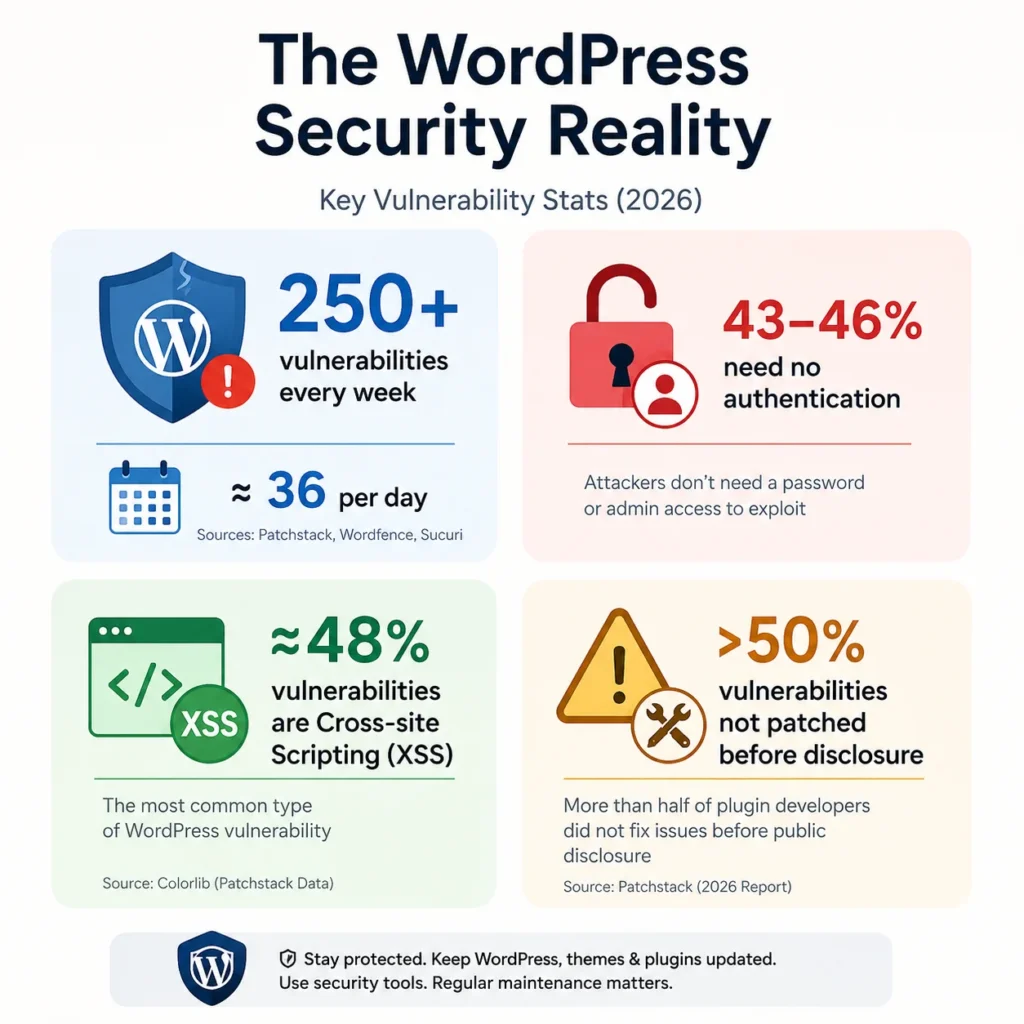
- 250+ plugin vulnerabilities are disclosed every week — an average of roughly 36 per day, according to a 2026 analysis citing Patchstack, Wordfence, and Sucuri data.
- 43–46% of newly disclosed vulnerabilities require no authentication at all to exploit, meaning attackers don’t need a password or admin access to get in.
- Cross-site scripting (XSS) accounts for nearly 48% of all disclosed WordPress vulnerabilities, according to Colorlib’s 2026 breakdown of Patchstack data.
- Perhaps most concerning: more than half of plugin developers contacted about a vulnerability did not patch it before the flaw was publicly disclosed, per Patchstack’s 2026 report.
That last point matters more than most people realize. Public disclosure is supposed to protect users — but if the developer hasn’t shipped a fix yet, disclosure hands attackers a documented roadmap to sites that haven’t updated.
How Hackers Actually Compromise WordPress Sites?
Most business owners imagine a hacker manually targeting their company. In reality, the overwhelming majority of WordPress attacks are fully automated. Bots continuously scan the web for outdated plugins, exposed login pages, and known vulnerabilities, then attack the moment a match is found — regardless of how small or unknown the business is.
Speed is the deciding factor. Research cited by Patchstack found that the weighted median time from public disclosure to mass exploitation is just 5 hours. Wordfence’s network reflects the same pressure at scale, reportedly blocking around 55 million exploit attempts and over 6.4 billion brute-force login attempts every month across the sites it protects.
I’ve seen this firsthand. One client’s site was running an outdated version of Elementor Pro, even though a security patch had already been released. The site looked and functioned normally, so the update was postponed. Attackers eventually exploited the known, already-patched vulnerability.
In another case, a client noticed the site had simply become slower. There was no defacement, no obvious malware banner — just a sluggish homepage. Investigation revealed injected JavaScript quietly using visitors’ browsers to mine cryptocurrency. It had likely been running for weeks, generating no red flags beyond mild frustration from visitors.
This is the pattern behind most compromises:
- Outdated plugins or themes with a known, publicly documented vulnerability
- Weak or reused admin passwords, exploited through automated credential-stuffing attacks
- Forgotten administrator accounts left active after an employee or agency relationship ends
- Unvalidated user input in poorly coded plugins, enabling injection attacks
- Supply-chain compromises, where a legitimate plugin’s own update channel is hijacked — a threat Patchstack specifically flags as accelerating in 2026, partly due to AI-generated (“vibe coded”) plugins shipped without proper security review
The Real Cost of a Hacked WordPress Site
The malware removal is usually the easy part. The expensive part happens afterward.
- Search engines can flag a compromised site as unsafe, showing warning screens to visitors instead of your homepage.
- Every hour of downtime translates directly into lost orders, missed enquiries, or declining search visibility — and lost rankings can take weeks or months to recover.
- Trust, once broken, rarely comes back at the same rate it left. A visitor redirected to spam or a phishing page once often doesn’t return, even after the fix.
- Attacks aren’t always about defacement. Many are designed to stay invisible — quietly sending spam email from your domain, mining cryptocurrency, or hosting phishing pages — precisely because an undetected compromise is more valuable to an attacker than an obvious one.
Recovery work typically includes identifying the entry point, patching it, restoring clean backups, resetting every credential, verifying file integrity, and monitoring for reinfection. That can take days. Routine monthly maintenance, by comparison, takes a fraction of the time and dramatically lowers the odds of ever needing recovery in the first place.
How to Actually Secure a WordPress Website
There’s no single plugin or setting that makes a site secure. Security is a set of habits, layered together:
1. Update everything — but test first. With 91% of vulnerabilities living in plugins and exploitation often beginning within hours of disclosure, delayed updates are the single biggest risk factor. On WooCommerce stores or sites with custom functionality, test updates in staging before pushing them live.
2. Cut plugin count aggressively. The average WordPress site runs 20–30 plugins. Every one is a piece of software you’re trusting with admin-level access. If it’s not actively used, remove it — along with inactive themes and abandoned dev tools.
3. Audit administrator access regularly. Former employees, freelancers, and agencies frequently retain admin rights long after their work is done. Review the user list on a schedule, not just when something goes wrong.
4. Enforce strong, unique passwords and enable 2FA. Credential-stuffing attacks rely entirely on password reuse. Two-factor authentication neutralizes most of them even if a password does leak elsewhere.
5. Maintain backups that are actually tested. A backup you’ve never restored is a hope, not a plan. Store copies off-server and periodically confirm they actually work.
6. Use security monitoring, not just a firewall. Traditional web application firewalls reportedly block only around 12% of WordPress-specific attacks, according to Colorlib’s 2026 data — WordPress-aware monitoring that watches for file changes, suspicious logins, and malware behavior catches far more.
7. Vet every plugin before installing it. Check update frequency, install count, developer reputation, and compatibility with the current WordPress version before adding anything to a live site.
8. Choose hosting that doesn’t cut corners. Cheap hosting can mean outdated PHP versions, poor server isolation, and delayed security patching at the infrastructure level — undermining even a well-maintained WordPress install.
Final Thoughts
WordPress’s popularity isn’t the problem — neglected maintenance is. With 11,334 new vulnerabilities discovered in the ecosystem in 2025 alone, and exploitation often starting within 5 hours of disclosure, “update when I remember” is no longer a viable security strategy for any business that depends on its website.
The good news: nearly every incident described here was preventable. Regular updates, a lean plugin list, strong access controls, tested backups, and real monitoring cut the risk dramatically — and cost far less than recovering from an attack.
Need help securing your WordPress website? I offer WordPress development and monthly maintenance plans covering security audits, plugin and core updates, malware cleanup, performance optimization, WooCommerce support, and backup management — so your site stays secure, fast, and ready to grow with your business.